
How to Increase Webinar Attendance Rates: 15 Practical Tips

Introduction
You can have the world's best webinar content, the most impressive speaker lineup, and the smoothest registration process, and still lose 50% of your audience before the event even starts.
This isn't a rare problem, it's the norm. The average webinar attendance rate hovers between 40-50%, meaning you're losing roughly half your registered audience before the event even starts. This number hasn't changed much over the years. Most organizations keep repeating the same attendance mistakes, expecting different results.
In this guide, we'll walk through 15 tips that will help you increase your webinar attendance rate. You don't need to implement all of them at once. Start with 2-3 that feel most actionable, measure your results, then layer in more. Within a few webinars, you'll see the compound effect: higher attendance, more engaged audiences, and better ROI on every event.
The Attendance Breakdown: What's Really Happening
Before we fix the problem, we need to understand it. Why do so many registered attendees vanish?
The Psychology of Registration Overload
There's a psychological principle called low commitment bias. When someone registers for your webinar with a single click, it requires almost zero actual commitment. They're not investing money, not signing a contract, they're just clicking a button. In their mind, they've left an "option open."
But as the webinar date approaches and other priorities pile up, that low-commitment decision gets deprioritized. It's just human nature.
Competing Priorities and the Forgetting Problem
By the time your webinar happens, your registrants are drowning in meetings, deadlines, and other demands. Even if they genuinely want to attend, they simply forget. Their calendar reminder might get lost in notification overload, or they get pulled into an unexpected meeting. But don’t forget that 47% of webinar views are on-demand (replay), so these people may come back to your webinar when they have time for it.
The Expectation-Reality Mismatch
Some registrants have misaligned expectations. They signed up for what they thought was a practical how-to webinar, but showed up and saw a 60-minute sales pitch. Or vice versa. When this disconnect happens, they just drop off.
Time Zone and Scheduling Conflicts
For global audiences, scheduling is very hard. A 2 PM EST time works for the East Coast but completely misses APAC and European audiences. Even well-intentioned registrants can't attend if the timing doesn't work.
Technical Barriers & Low Trust
Some people avoid webinars because they've had bad experiences. Laggy video, audio issues, clunky interfaces, these technical failures create hesitation. They don't want to waste time troubleshooting your webinar platform or downloading a platform to just watch your webinar.
The Replay Expectation
When you mention that a recording will be available, you've just given people permission to skip the live event. Why rush to attend live if they can watch it later at their convenience? This is one of the biggest attendance killers.

Run Webinars Your Audience Will Want to Attend
Start for free with up to 30 registrants. No credit card needed.
Start for free15 Tips That Drive Webinar Attendance
Tip 1: Validate Your Topic
The foundation of everything starts here. A compelling topic that resonates with your audience is non-negotiable, no amount of email sequences or reminders can overcome weak positioning.
What to do: Check your support tickets, sales calls, and community conversations. Where do you see the same problem mentioned repeatedly? What blog posts get the most engagement and shares? What questions come up over and over in your DMs?
Don't guess what interests people. Ask directly: Run a quick poll in your audience asking "If I hosted a free webinar this month, which of these topics would help you the most?"
Once you've validated the topic, make your positioning specific and outcome-driven. Not "Advanced Sales Techniques" but "How to Increase Your Close Rate by 34% in 90 Days”
This single step eliminates wasted effort on topics nobody actually wants to hear about.
Tip 2: Choose Wednesday or Thursday
Day selection matters more than most people realize. Wednesdays have the highest live attendance rates, followed closely by Tuesdays and Thursdays.
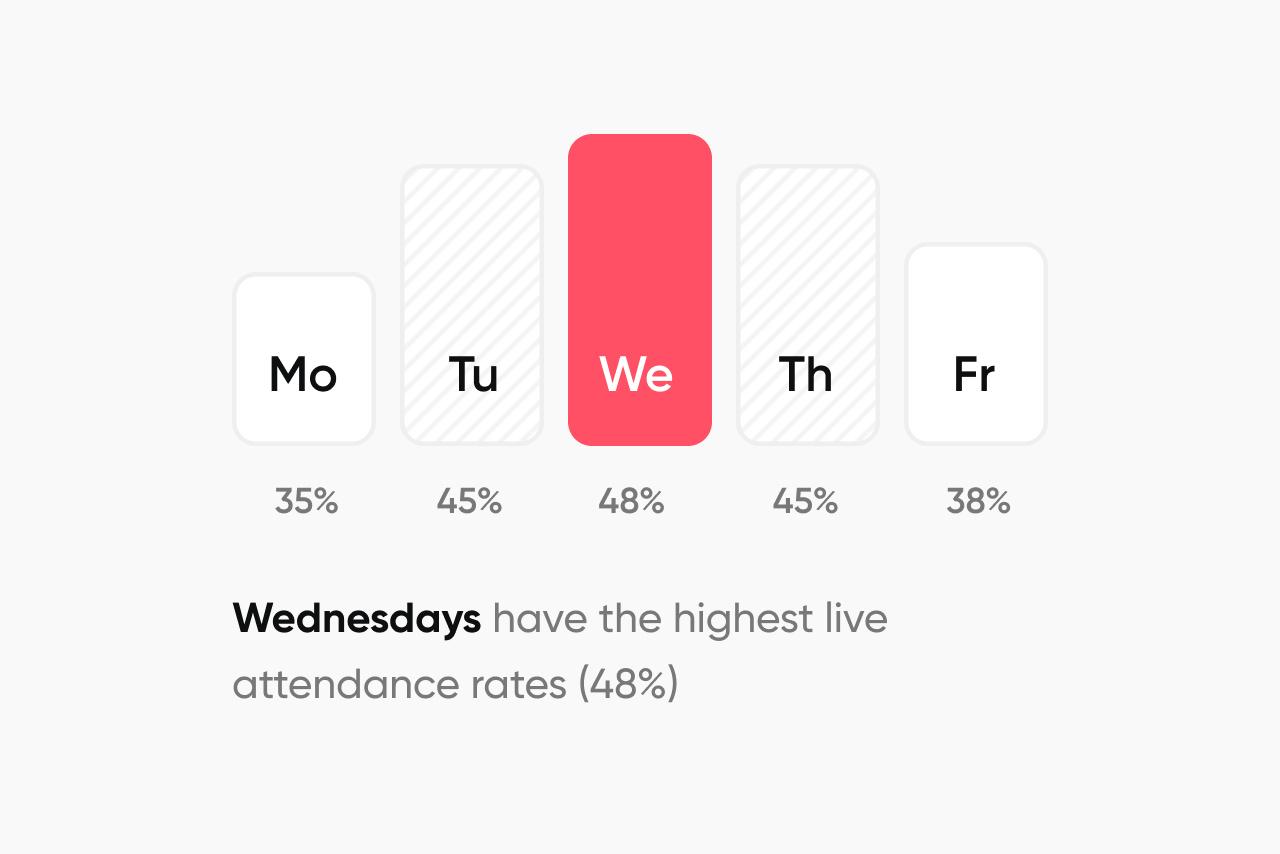
Why? Because Monday is for catch-up, and by Friday, people are already mentally checking out. Wednesday-Thursday is the sweet spot when people are settled into their work week and focused.
Tip: If your audience spans multiple industries or roles, they might have different rhythms. Run 3-4 webinars and track which day your specific audience shows up for, then optimize around that pattern.
Tip 3: Lock in 11 AM or 2 PM
If you are planning a webinar for a global audience, consider these 3 options:
Option 1: 9 AM ET / 2 PM CET (US/Europe focus) / 9 PM Singapore
Option 2: 4 PM CET / 9 PM Singapore (Asia/Europe focus) / 9 AM ET
Option 3: Host twice - different sessions for different regions
Tip: You need to understand that there's no perfect time when your target audience is global, so don't try to make everyone happy. Pick the time zone that serves your highest-value segment, then make your replay easily accessible for everyone else.
Tip 4: Keep Your Registration Form to 3 Fields Maximum
Every extra field you ask for is a registrant you lose.
What you actually need:
- Name
- Email address
- Company (optional)
Everything else like job title, phone number, budget, company size can wait, and can be enriched automatically.
The registration page copy matters too. Learn more about it here.
Tip 5: Add an "Add to Calendar" Button
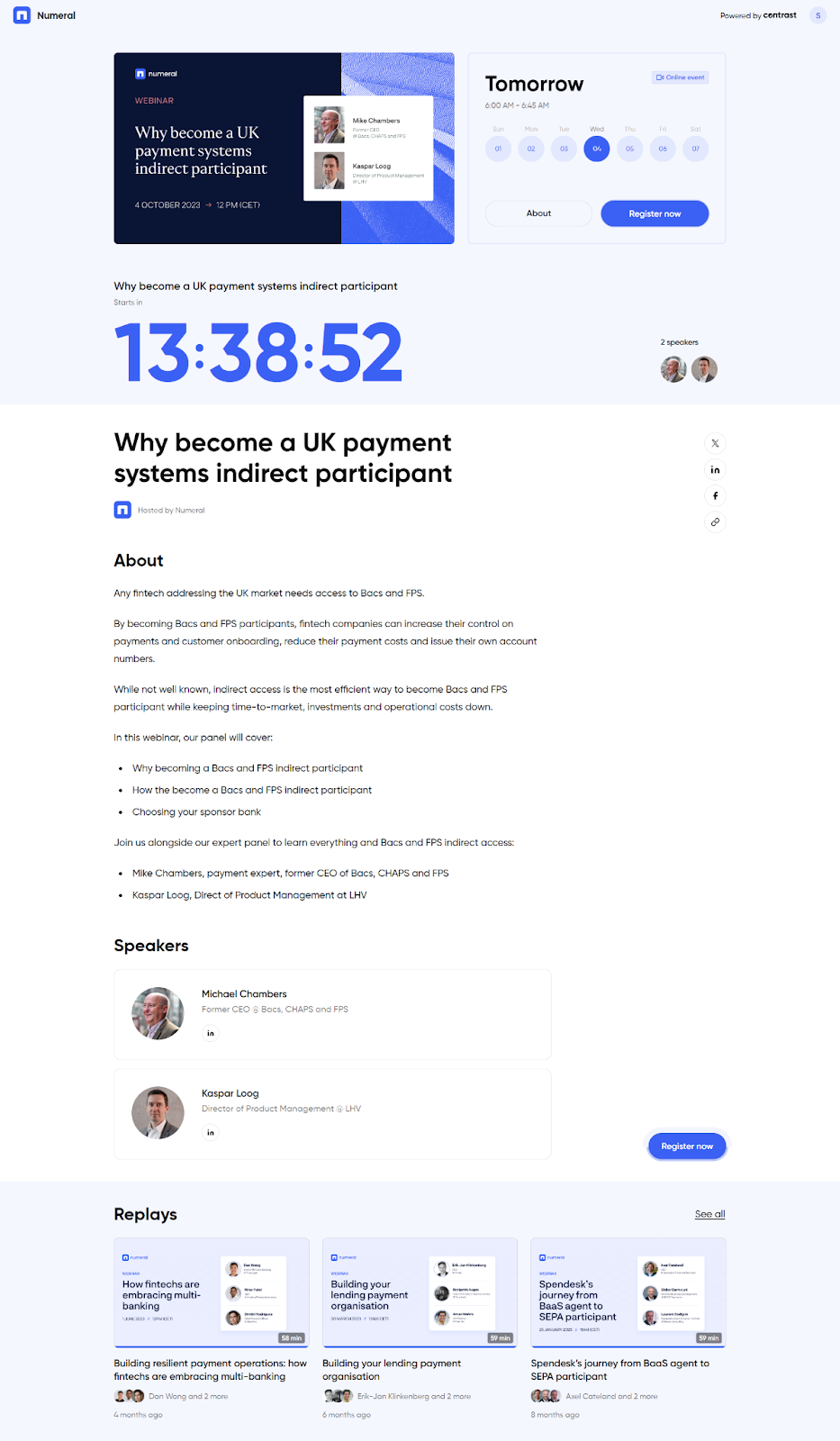
When someone adds your webinar to their calendar, they've made a micro-commitment. This single action increases the probability they'll actually attend.
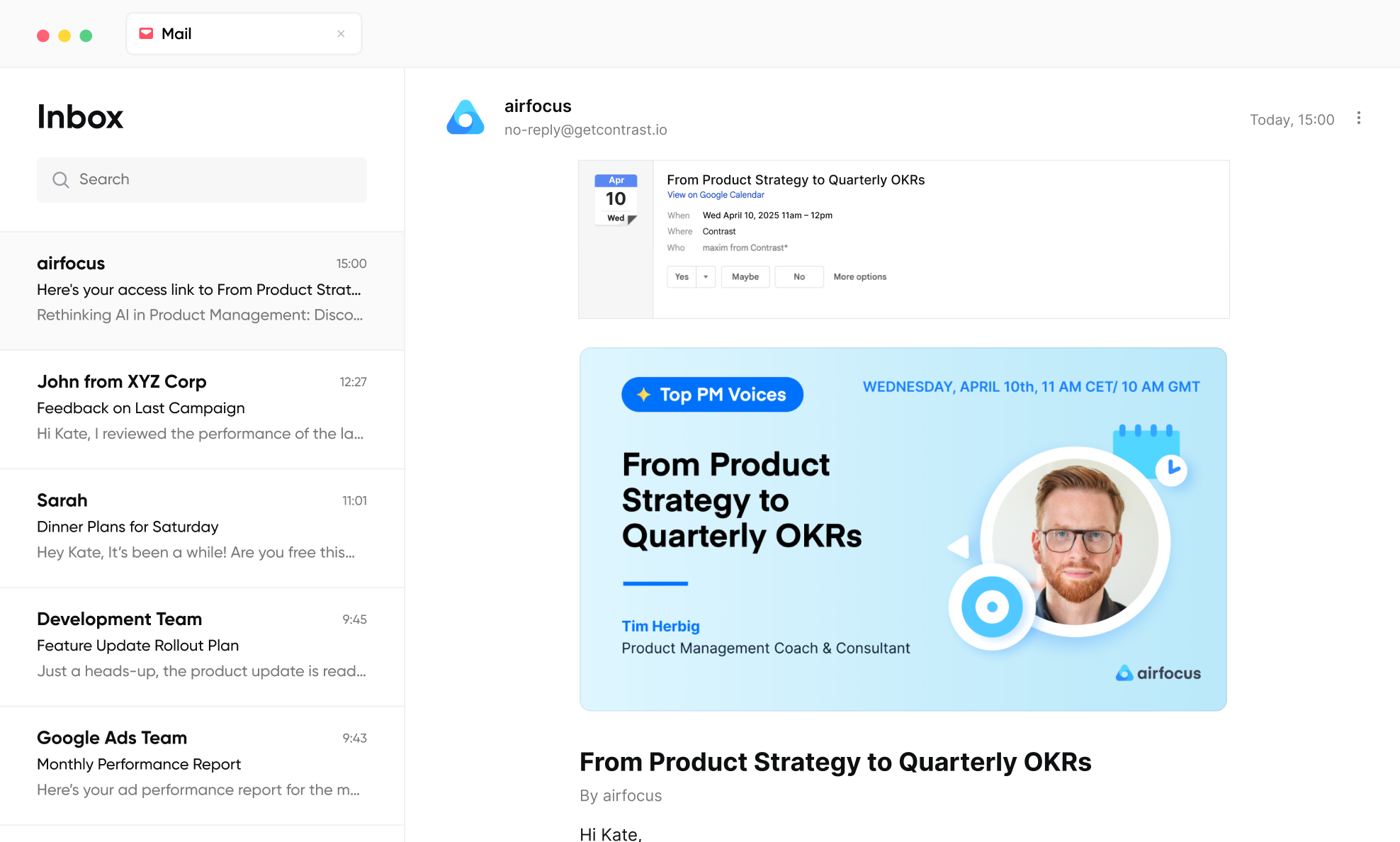
Why it works: The "Add to Calendar" button works because of a psychological principle called commitment and consistency. Once people take a small action, they feel internal pressure to follow through with related future behavior. When a registrant clicks that button, they're doing more than organizing their schedule; they're making a tangible, visible declaration of intent. The webinar shifts from being a passive email in an inbox, which is easy to ignore, forget, or deprioritize, to an active, named block on their calendar that sits alongside meetings they've already committed to attending. This changes how their brain categorizes the event: it's no longer optional content they "might get to," it's a scheduled obligation.
Tip 6: Engage Registrants Between Signup and the Event
The space between registration and the live event is a massive opportunity most companies waste.
What you can do:
1. Open the Q&A before the event: This is the most underrated tactic on this list. When registrants can submit questions ahead of time, two things happen simultaneously:
First, they become more invested because submitting a question is a micro-commitment that makes them significantly more likely to show up because now they want to hear their question answered.
Second, and more importantly for you as the host, you get a real-time window into exactly what your audience is thinking about, worried about, and confused by. If 40 people submit variations of the same question, that's a signal to restructure your content around that topic. If nobody asks about a section you planned to spend 20 minutes on, that's feedback too.
The result is a presentation shaped by actual audience demand rather than your assumptions about what they need, and more relevant content directly translates to better watch time, fewer drop-offs mid-webinar, and a more engaged room. You're letting the audience co-author the agenda, which makes them feel heard before the event even starts.
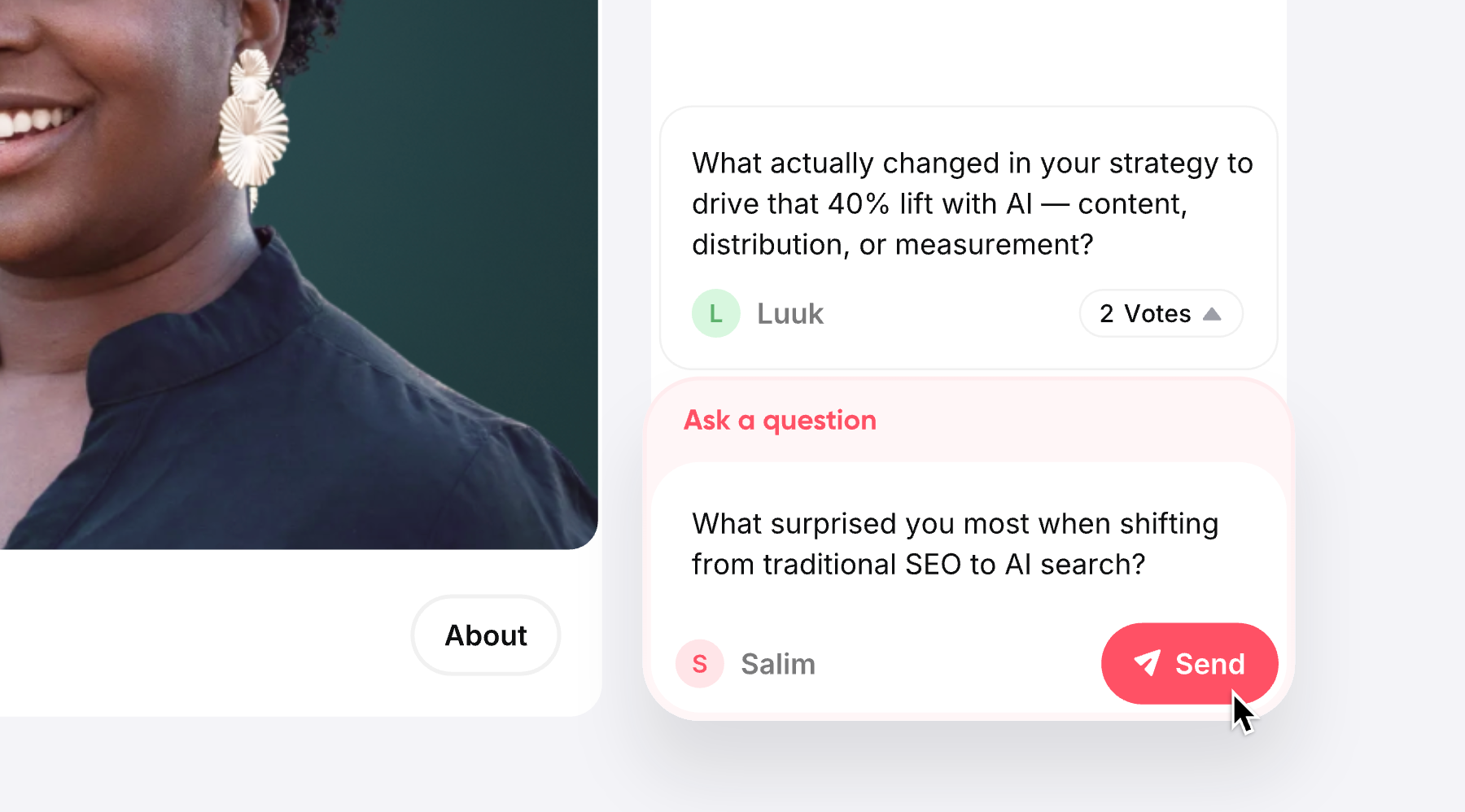
2. 48 hours before the event, send a pre-webinar survey asking "What's your biggest challenge with this topic?" This primes their brain and shows you care about their specific problems.
3. Share pre-webinar resources: a relevant article, case study, or short video that provides context. Ask them to introduce themselves in a pre-event community space if you have one.
When people invest their time before the event, they're more committed to showing up.
Tip 7: Send 5 Strategic Emails
Email marketing is the best channel for driving webinar registrations, with 91% of marketers naming email as their top-performing channel for attracting qualified attendees.
But the sequence matters more than the frequency. Here's what works:
Email 1 (2-3 weeks out) – The Announcement:
- Focus on the problem you'll solve, not the format
- Lead with what attendees will be able to do after, not what you'll tell them
- Include an early-bird bonus if relevant (exclusive checklist, template)
Email 2 (1 week out) – The Value Preview:
- Share one compelling insight or tip related to your topic
- Mention who's speaking and why they're credible
- Include the full agenda
- Make it clear this is educational, not a sales pitch
Email 3 (3-4 days out) – Social Proof:
- Share how many people are already registered
- Include testimonials from past attendees
- Mention what's exclusive to live attendees (live Q&A, interactive polls, exclusive resource)
Email 4 (24 hours out) – Logistics + Excitement:
- Confirm the exact time with the time zone clearly stated
- Provide all technical details (join link, system requirements)
- Suggest they add it to their calendar
- Keep this short and action-focused
Email 5 (1 hour before) – Final Reminder:
- This one is short. One sentence plus the join link.
- Subject line: "Starting in 1 hour!”
- Direct join link, nothing else
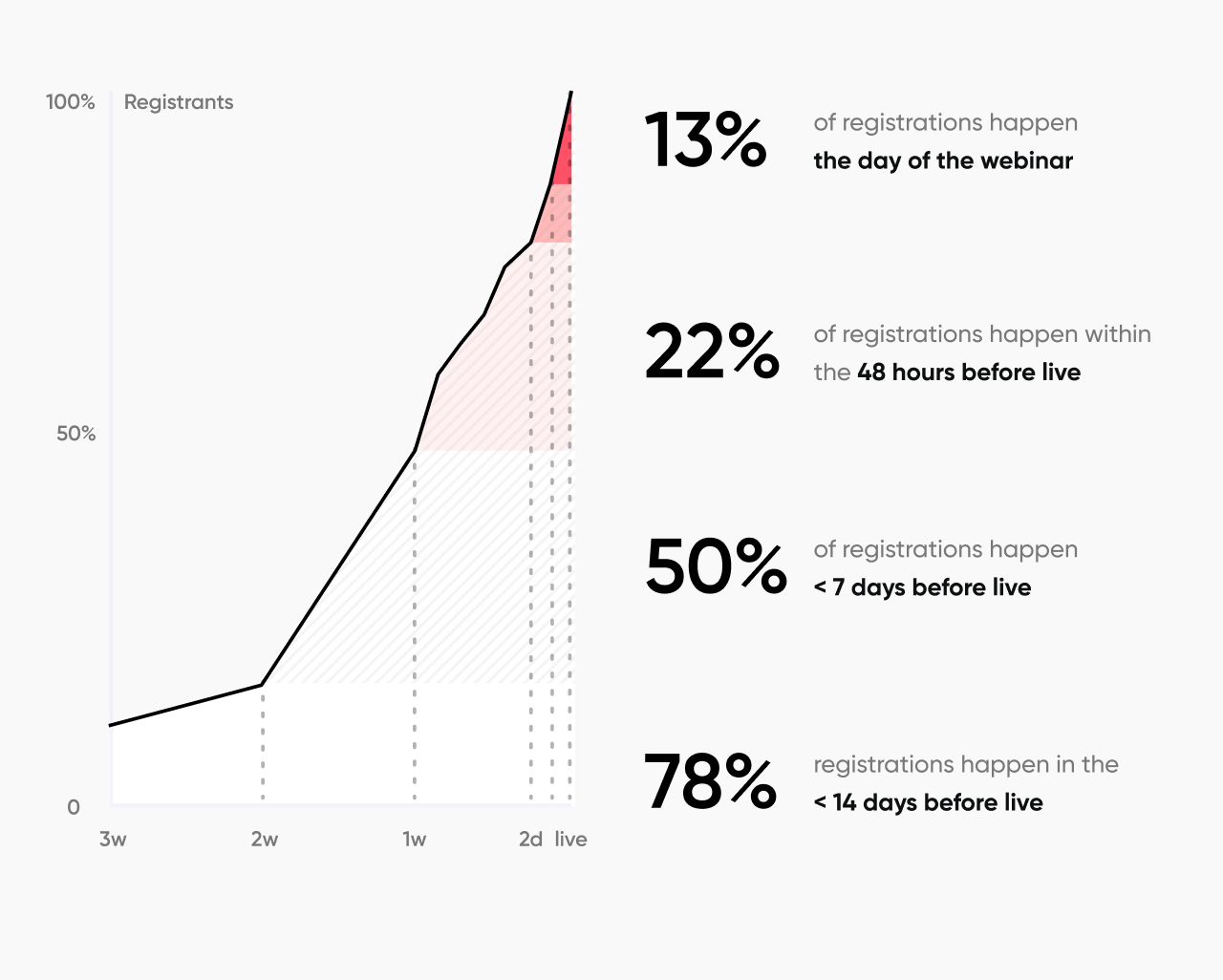
50% of all webinar registrations happen within 7 days of the event, with 48% happening in the final week. Your final two emails matter most.
Tip 8: Run a Live Poll Every 20-30 Minutes (And Show Results in Real Time)
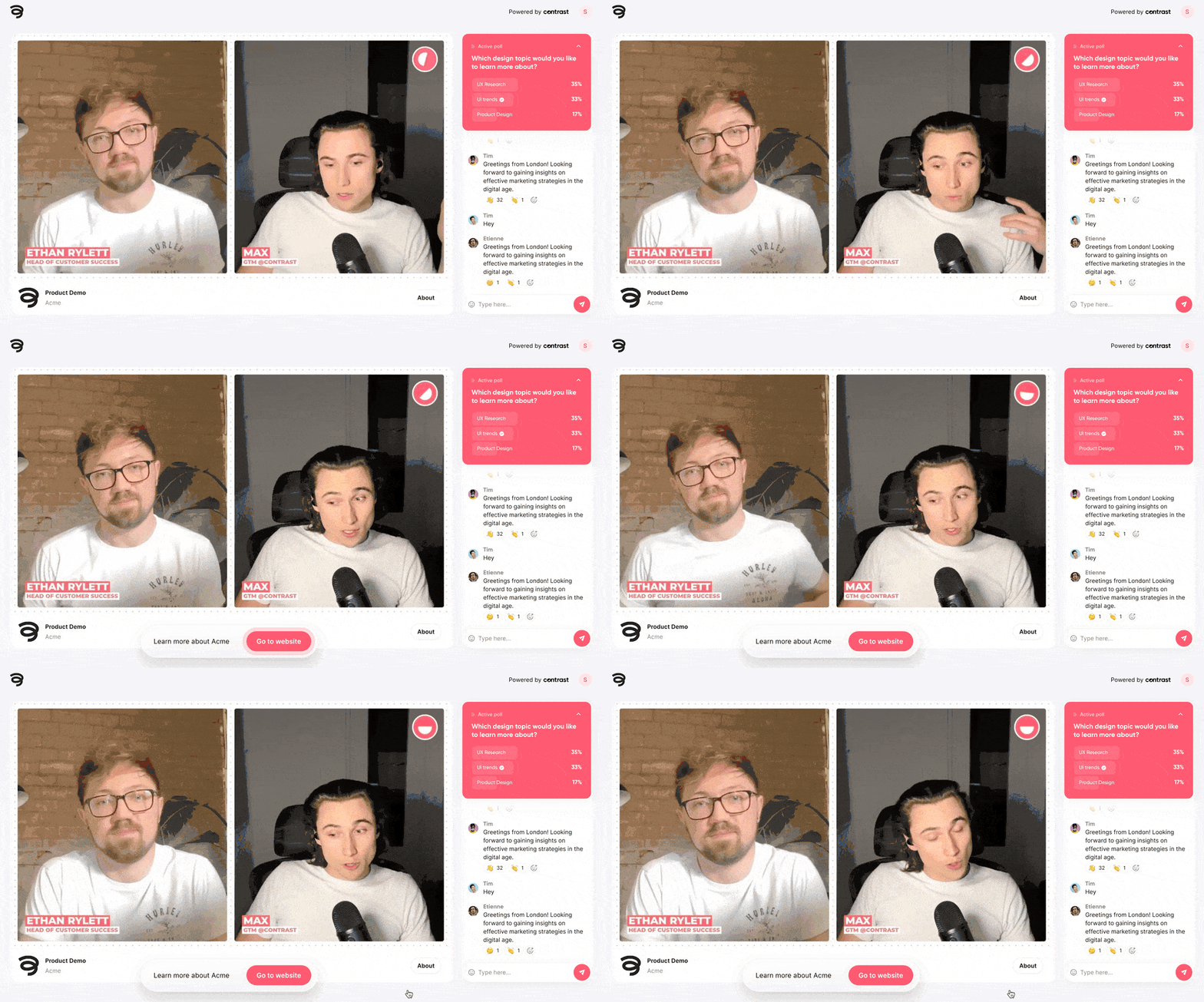
Polls aren't just for engagement metrics, they're one of the most effective tools for keeping registered attendees from dropping off before or during the event. When people know there's a live poll where their input will be displayed and discussed in real time, they have a tangible reason to join on time and stay present throughout. Missing a poll feels like missing something; your vote didn't count, your perspective wasn't represented. That small fear of exclusion is a surprisingly powerful motivator.
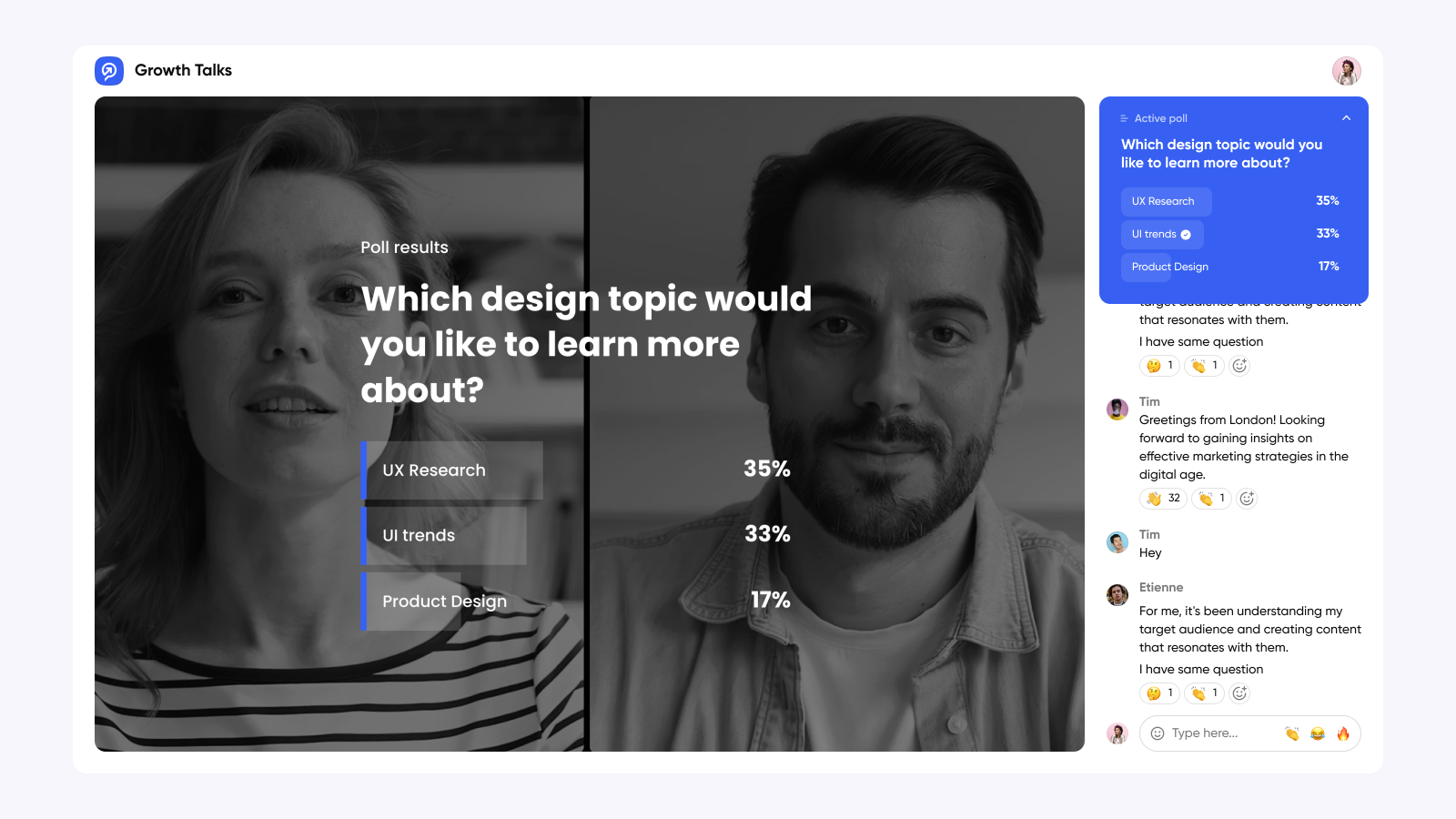
The deeper reason this works is that polls transform passive viewers into active participants. Watching a presentation requires almost no commitment; you can have it running in the background while you check your email. Voting in a poll requires attention and decision-making, and once someone has contributed, they're more invested in seeing how it plays out.
When you display results live and actually respond to them, "Interesting, most of you said closing is your biggest challenge, so let me show you exactly how we handle that", attendees feel like they're shaping the conversation in real time rather than sitting through a scripted presentation. That feeling of influence is what keeps people in their seat.
How to do it right: Ask questions that actually matter to your audience, not throwaway icebreakers. During a webinar on sales processes, ask "Which of these sales stages do you struggle with most?" Then respond to the results directly and specifically. When people see their peers' answers reflected back and watch you adjust on the fly, they feel heard, and people who feel heard don't leave early.
Tip 9: Make Live Q&A the Centerpiece, Not an Afterthought
Contrast’s webinar stats report shows that 92% of webinar attendees say the event must include a live Q&A session, and that number exists for a good reason. Live Q&A is the single biggest differentiator between watching a live webinar and catching the replay later.
It's the one thing a recording can never replicate. People don't block out time on their calendar and show up live for your slides. They show up because they can ask a question and get a real answer from a real expert real time. Remove that possibility, and you've removed the most compelling reason to attend live rather than watch at 1.5x speed whenever.
Tip 10: Invite a Guest Speaker (3x More Engagement)
Guest speakers drive significantly more registrations, with webinars featuring outside experts getting 3x more engagement than internal-only speaker webinars.
This works because:
- Credibility transfer: An outside expert brings their reputation. Their audience trusts them, which extends to you.
- Fresh perspective: Outside speakers prevent the "us talking about us" problem that kills engagement.
- Expanded reach: Your co-speaker naturally promotes to their network, expanding your registrations beyond your existing audience.
- Reciprocal promotion: If it's a true partnership, both parties promote, doubling your marketing reach.
Tip: Find someone whose audience would really benefit from your topic, then structure the partnership so both parties have clear incentive to promote.
Tip 11: Remind Strategically
The best sequence:
- 1 day before: "See you tomorrow", “{Event name} is tomorrow” with the join link
- 1 hour before: "Starting in 1 hour: {Event name}"
- 5 minutes before: Optional final notification “Live in 5 min: {Event name}"
The psychology here: most people make their final attendance decision in the last 24 hours. By then, they need the join link to be easy to find and your webinar to be top-of-mind among competing demands.
Don't over-remind earlier in the week. Too many pre-webinar emails feel like spam.

On Contrast reminder emails are sent automatically, you don’t have to send anything manually.
Tip 12: Create Genuine Incentives for Live Attendance
When people know they can watch the replay later, live attendance drops. The fix isn't to threaten them with no recording, it's to make live attendance more valuable.
Some incentives to add:
Live Q&A with speakers: Not in the replay. Live attendees get real-time answers. Emphasize this heavily in your promotion.
Exclusive bonus resource: Live attendees get a bonus template, tool, or extended checklist available only during the event.
Exclusive networking or community access: Offer live attendees access to a post-webinar Q&A session, exclusive community channel, or office hours with the speaker. Create something that makes live attendance feel special.
Time-limited offer: If you're promoting a product or course, offer a special price or bonus only for live attendees (time-limited to create urgency).
Tip: These incentives need to be real. Don’t fake it, otherwise it will work against you.

Run the Most Engaging Webinars with Your Industry
Start for free with up to 30 registrants. No credit card needed.
Start for freeTip 13: Segment Your Promotional Audience (Don't Send One Message to Everyone)
How to segment:
- Cold email list: Emphasize social proof, credentials, and why this is valuable for someone who doesn't know you yet
- Warm subscribers: Highlight exclusive insights and position the webinar as a natural next step in what they've been learning
- LinkedIn audience: Use personal accounts to promote the webinar. Talk about the problems they’ll solve if they attend your webinar
- Past attendees: Emphasize what's new/different, remind them of how much value they got last time, make them feel like insiders
Different segments have different psychological motivations. Warm audiences want to deepen their knowledge with you. Cold audiences need proof you're credible. You need to tailor your message accordingly.
Tip 14: Use the Day-Of Strategy: Start Strong and Provide Multiple Access Options
You've done everything right up to this point. Now the execution matters.
Start with compelling content, not housekeeping. Many people join 2-3 minutes before or just as you're starting. Don't launch into "Thanks for joining" and administrative announcements. Start with a question, a surprising statistic, or a story that grabs attention immediately. Save housekeeping for after the first 10-15 minutes when people have mentally committed to staying.
Provide multiple access options:
- Browser-based (no software download required)
- Mobile app option (for people on phones)
The easier you make it to attend, the more people will. Some registrants will literally not attend because they can't figure out how to join or don't want to download your platform. Remove these barriers.
Tip 15: Follow Up Immediately After (And Separate Attendees From No-Shows)
Most companies drop the ball here. The webinar ends, and people move on. But this is where you lock in attendees for your next event and convert no-shows.
For attendees (send within 1 hour):
- Thank you email with recording link
- 3-5 key takeaways summarized
- Resources/tools mentioned during the webinar
- Your primary CTA (sign up for course, book call, etc.)
- Invitation to register for your next webinar
For no-shows (send within 24 hours):
- Low-pressure "sorry you missed it" message
- Social proof of what attendees said
- Brief teaser of key moments
- Replay link
- Quick survey: "Why couldn't you make it?" (important for improving future attendance)
- Add them to a separate segment for your next webinar
The survey is very important. You'll learn whether it was a scheduling conflict (adjust timing next time), they forgot (more aggressive reminders), or they lost interest (revisit your topic positioning).
People who attended your last webinar are 40-60% more likely to register for your next one. When you end strong with excellent follow-up, you build momentum. Higher attendance creates more engaged communities, which drives higher attendance for future events. You can even use on-stage CTAs during your webinar to promote your next webinar.
Want to implement this systematically?
The framework in this article is designed to be implemented step-by-step. You don't need all 15 tips to see improvement. Start with 2-3 that feel most actionable for your situation.
And if you want a platform built for this kind of systematic execution, Contrast makes it easy with:
- Q&A opened before the webinar to gather questions
- Live polls and Q&A on stage that drive engagement (and attendance) during the live webinar
- Automated reminder email sequences
- Analytics showing which promotion channels drive actual attendees
- One-click registration for returning attendees
But regardless of platform, the principles in this article apply. Focus on systematically removing barriers, building commitment, and respecting your audience's time.
That's how you go from 20% to 65%+ attendance.
Run The Most Engaging (and Easy) Webinars
Start for free with up to 30 registrants. No credit card needed.
Start for freeConclusion
The best way to think about all this: improving webinar attendance is ultimately about respecting your audience's time.
When people register for your webinar, they're making a bet on you. They're betting that spending an hour with your content will be worth their time.
When only 20% of them show up, that's a signal that something in your messaging, positioning, or follow-up didn't land. You promised value, and they either forgot, got pulled into something else, or didn't feel like the trade-off was worth it.
Companies that get 65%+ attendance rates communicate clearly, they remove friction, they build commitment, and they make it easy for people to follow through.
This isn't manipulation. It's about being systematic and respectful.
Start with one or two of these levers. Pick the ones that are easiest to implement in your situation. Run one webinar with that baseline. Measure your attendance rate. Then add another lever.
Within 2-3 webinars, you'll see the compound effect. Your attendance rates will improve, which means more engaged attendees, which means more leads, which means better ROI on your webinar investment.
That's the real win.
Quick Reference: The 15 Tips at a Glance
- Topic Validation - Validate demand before promotion
- Choose Wednesday or Thursday - Highest attendance days
- Lock in 11 AM or 2 PM - Peak attendance times
- Registration Form (3 fields max) - Minimize friction
- Add to Calendar Button - Create commitment device
- Pre-Event Engagement - Engage between signup and event
- Email Sequences - 5 strategic emails at key moments
- Live Polls - Run every 20-30 minutes
- Live Q&A - Make it the centerpiece
- Guest Speakers - 3x more engagement
- Strategic Reminders - 3-step sequence wins
- Live Incentives - Q&A, polls, exclusive resources
- Audience Segmentation - Different messages for different segments
- Day-Of Execution - Start strong, multiple access options
- Post-Event Follow-Up - Thank-yous, replays, surveys
Frequently Asked Questions (FAQs)
Q: What if my webinar is at an inconvenient time for my audience?
This is tricky because there's no universally "perfect" time. But here are your options:
- Host multiple sessions. Run the same webinar at 9 AM ET and 2 PM ET, or run separate sessions across time zones
- Lean hard into replay. Make the replay readily available and well-promoted. You'll get strong replay numbers
- Record it early. Host a private session with key customers/prospects, then repurpose that recording
- Accept the tradeoff. You might get 40% attendance instead of 55%, but if it's your only option, optimize everything else
The key: don't blame timing as the reason your attendance is low. There are other levers you control.
Q: Should I charge for my webinar to increase attendance?
This is a strategic decision, not a guarantee:
Paid webinars:
- Get 70-90% attendance rates (because people have invested money)
- Attract a smaller, more committed audience
- Generate direct revenue
- Reduce your lead-generation potential
- Better for specialized, high-value training
Free webinars:
- Get 30-50% attendance rates (depending on optimization)
- Generate large volumes of leads
- Build your email list faster
- Create more brand awareness
- Better for top-of-funnel awareness
Most B2B companies use free webinars for lead generation, then use paid mini-courses or workshops for higher commitment segments. That's the balanced approach.
Q: What if I have a low-registration number?
This is a different problem than attendance rate. You need to focus on promotion, not the tweaks in this article.
Low registration typically means:
- Your topic isn't compelling to your audience
- Your promotional channels aren't reaching the right people
- Your messaging isn't clear about the value
- You're not promoting to enough people
- You're promoting too late (need 3-4 weeks)