
QBS Replaced Microsoft Teams With Contrast and Generated $55K in Pipeline From One Webinar

from Daniel Semenuk, Manager, Marketing & GTM Engineering at QBS
QBS put about $500 into a single Contrast webinar for its existing customers. Within 10 days, that webinar had generated $55,000 in pipeline and $36,000 in closed-won business. Each registration cost QBS about $1.
QBS makes Safety-Care, the de-escalation training used by schools, ABA clinics and healthcare facilities. The company has been in business for almost 30 years and has between 15,000 and 20,000 active customer accounts. In February 2026, QBS relaunched its webinar series on Microsoft Teams, and it took off fast. By May, a product update webinar drew more than 1,000 registrants. That was more than the 1,000-person limit on QBS’s enterprise Microsoft agreement allowed, and people trying to join were told “access denied.”
“We feel like we had struck gold with getting so many people interested in one of these webinars only a few months in, and then we couldn’t accommodate them,” said Daniel Semenuk, Manager of Marketing and GTM Engineering at QBS.
QBS switched to Contrast. On its first webinar built for existing customers, Contrast showed the team exactly who registered and attended, and customer service called each of them. Those calls turned into $36,000 in closed-won business within 10 days.
Results at a Glance
Contrast lets QBS trace every webinar from the first registration through to closed-won revenue.
| Metric | Result |
|---|---|
| Pipeline from one customer webinar | $55,000 within 10 days, on about $500 invested in Contrast |
| Closed-won business | $36,000 within the same 10 days |
| Cost per registrant | About $1 |
| Webinar capacity | Moved to an annual Contrast plan after outgrowing the 1,000-person limit on Teams |
| Webinar data in HubSpot | Questions, chat, live watch time and replay views synced to every contact automatically |
Contrast delivers these results by syncing every registration and attendance record into HubSpot at the account level, so QBS knows exactly which customers to call after each webinar.

About QBS
QBS has been building crisis prevention and de-escalation training since 1997. Its flagship program, Safety-Care, is grounded in Applied Behavior Analysis and used by schools, hospitals, human services agencies and ABA organizations across North America. More than 300,000 staff are certified in Safety-Care every year. The company’s stated purpose is to protect vulnerable populations.
QBS has between 15,000 and 20,000 active customer accounts. That gives it a large existing customer base to educate, support and grow with as organizations add more of the Safety-Care system to their programs.
Daniel Semenuk leads go-to-market as Manager of Marketing and GTM Engineering. His team covers marketing, community engagement and partnerships, GTM engineering, revenue operations and content operations. The webinar program is run by Erin Mayberry, QBS’s Community Engagement Manager. Erin spent about a decade as a BCBA certified master trainer with QBS before rejoining the marketing team two years ago, so she knows both the training and the customers firsthand. She relaunched QBS’s webinar series, Safety-Care Live, in February 2026.
Why QBS Left Microsoft Teams Webinars and Switched to Contrast
QBS didn’t go looking for a new webinar platform because its webinars weren’t working. It went looking because they were growing faster than Teams could handle.
What Happens When You Hit the 1,000-Attendee Limit on Microsoft Teams Webinars
In May 2026, a Safety-Care Live session on product updates drew more than 1,000 registrants. QBS’s enterprise Microsoft agreement capped Teams at 1,000. Customers who tried to join after that were turned away.
“Ultimately what we’re all trying to do is provide great customer experience, and that’s not a great customer experience,” Daniel said.
The only fix was a bigger Microsoft contract. Microsoft offered more capacity, but through an expanded enterprise agreement on top of what QBS already spends. Only some webinars get that big, and more capacity wouldn’t fix anything else. “Not every one of our webinars is attracting 1,000+ people,” Daniel said. “Expanding that even further just to accommodate registrations didn’t make an awful lot of sense, because that only solved the one problem.”
What Happens to Microsoft Teams Webinar Recordings After the Live Session?
At QBS, every webinar went to Vimeo and stopped there. After each session, the team uploaded the recording to a Vimeo channel by hand. Nothing else happened with it. The content got one live airing and then sat in a video library.
“Not only do we have the bottleneck of the registrations, but we also had, well, what do we do with this afterwards?” Daniel said.
Can You See Microsoft Teams Webinar Engagement Data in HubSpot?
Not in any way QBS could use. Teams told QBS two things: how many people registered and how many showed up. It didn’t say who watched, what they asked or which accounts were interested. Every reminder, follow-up email and contact list was built by hand in HubSpot, with email validation each time. There was no way to trace a webinar through to pipeline.
“We were running on a lot of estimates,” Daniel said.
Why QBS Chose Contrast Over Zoom, Riverside and Descript
Daniel joined QBS in June 2026, a month after the Teams cap turned customers away. He already knew Contrast from Admin Arena, a LinkedIn competition filmed on Contrast. “I had just finished up shooting the Admin Arena season using Contrast, and I really liked the platform,” he said.
QBS still evaluated other options: Descript, Riverside and Zoom, which it already uses for meetings. Contrast solved the registration cap during the evaluation. It then won on the two problems the others didn’t solve.
Repurposing. “The remixing of content and better leveraging assets that we’re creating that are clearly high value was on the board in terms of the vetting process, and that’s where the scales really started tipping towards Contrast,” Daniel said.
HubSpot engagement data. Plenty of tools can trigger HubSpot workflows. QBS needed to see how every contact engaged. “Does it help with the automations? Okay, that’s great. A lot of things can help with that. But the engagement piece… that’s where Contrast and only really a couple other options were actually going to be effective,” Daniel said.
QBS’s Webinar Results on Contrast: $55K Pipeline, $36K Closed-Won and $1 per Registrant
How QBS Got Nearly Twice as Many Live Attendees as Expected on Its First Contrast Webinar
QBS’s first webinar on Contrast ran during back-to-school season, when the team expected fewer people from its core school market to show up live. Almost twice as many people joined live as the team had planned for.
Attendees didn’t just watch. Contrast gave them ways to take part: clicking CTAs, voting in polls, asking questions and upvoting the ones they wanted answered. On one QBS webinar, a single question drew so many upvotes that the trainer made sure to answer it. When a question gets that much support, QBS covers it, even if there are only a few minutes left. Customers love it. Daniel says they give “incredible feedback on the experience” of using these features. “Having that kind of interactivity makes people not afraid. It makes people more open to just asking those questions live,” he said.
Q&A on Contrast
Room to grow. QBS’s monthly webinars now regularly draw registration numbers in the top 10% of all webinars on Contrast. You can see how your own webinars compare at Webinar Benchmark. To keep up with that demand, QBS has moved to an annual Contrast plan. “We didn’t want to ever have to deal with the cap, and we’re willing to invest in the platform to make sure that our customers are having a great experience,” Daniel said.
How a $500 Contrast Webinar Generated $55K in Pipeline and $36K in Closed-Won Business
The session was the first webinar QBS had ever run just for existing customers. One of its master trainers explained how QBS’s add-on modules fit the system customers already use in their schools, ABA clinics and healthcare facilities, then opened up a long Q&A.
On Teams, QBS would only have known how many people registered and attended. Contrast told the team who they were. It tracked every registrant and attendee and tied each one to their account in HubSpot.
QBS’s customer service team used that list for a call-down, a quick check-in with every registrant and attendee to ask whether the session was useful. Every call went to a customer who had just engaged with QBS, not a cold contact. Within 10 days, those check-ins had turned into $55,000 in pipeline and $36,000 in closed-won business.
QBS worked out the cost at about $1 per registrant, or roughly $500 for the whole webinar. “$500 investment within 10 days of the webinar had generated $55,000 in pipeline and $36,000 in closed-won business,” Daniel said.
How QBS Turns Every Webinar Into Clips, Newsletters and an On-Demand Channel
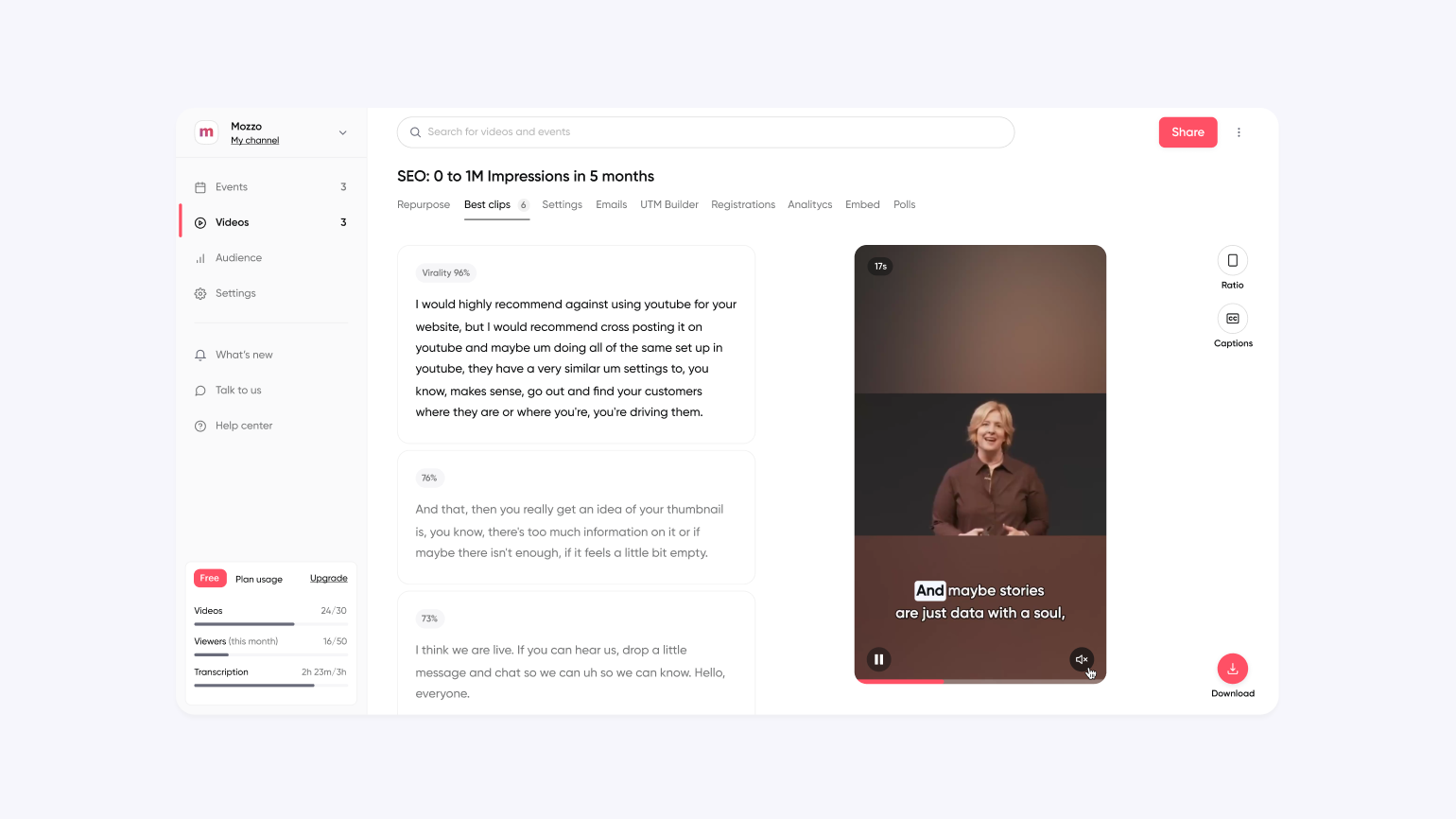
On Teams, a QBS webinar ended when the live session did. The recording went to Vimeo and stopped there. On Contrast, every replay lives on QBS’s channel page, right next to registration links for upcoming sessions. Someone who finds an old webinar can sign up for the next one on the same page.
The team uses Contrast’s AI clips to cut short videos from its webinars, and is starting to turn sessions into newsletter content. The reminder and follow-up emails that used to be built by hand in HubSpot now go out from Contrast too.
For QBS, the value isn’t just more content. Every replay and clip puts its trainers in front of customers again. “It doesn’t bother us to have all that traffic directing to our Contrast channel page,” Daniel said. “If our customers and prospects are getting value out of it, then Contrast is helping us build even more trust than we’ve been able to build over the last 30 years that we are the go-to experts when it comes to de-escalation training in vulnerable populations.”
How QBS Uses Contrast’s HubSpot Integration to Find Engaged Accounts
On Microsoft Teams, QBS got two numbers: how many people registered and how many showed up. On Contrast, every contact record in HubSpot shows what that person did on each webinar: the questions they asked, what they said in the chat, how long they watched and whether they came back for the replay. Contrast also builds the registrant, attendee and replay lists in HubSpot automatically, so nobody downloads or re-uploads a spreadsheet.
Contrast creating dynamic lists (segments) HubSpot
Webinar activity is the first thing reps see on a HubSpot contact. Daniel set up Contrast’s activity card in HubSpot to appear only for contacts who have registered for a QBS webinar. When it appears, it sits at the very top of the contact’s activity timeline. It shows which webinar they joined, their watch time and which CTAs they clicked, with a link to the registration page. Reps only need one rule: if the card is there, the contact is engaged. “It’s pretty magical and it doesn’t require building out a giant lead scoring model,” Daniel said.
QBS can see engagement across a whole account, not just one person. Because Contrast puts the lists (segments) in HubSpot, Daniel can compare them. Say one person at a customer registered and watched live, and a colleague at the same organization later watched the replay. That tells QBS the first person found it valuable enough to pass on. “Now we can cross-reference everything and really come up with an idea of how engaged an account is beyond just one single person,” Daniel said.
How Contrast Is Helping QBS Expand Its Webinar Program Into New Formats
With Contrast handling registration, HubSpot data and replays, QBS’s team no longer spends its time building workflows. That time now goes to customers. “Now we can focus on getting feedback directly from our customers and saying, what else can we show you? What else would you like to see? Because we can do whatever we want now,” Daniel said.
New webinar formats. Safety-Care Live is one format built for one purpose. Because customers have embraced it, QBS is exploring others: shorter sessions, deeper panel discussions, and long live sessions where a rotating cast of experts takes questions. “I could be running 15-minute webinars, 30-minute webinars, hour-long webinars, 3-hour-long webinars,” Daniel said.
Webinars on QBS’s own domain. Contrast lets QBS host its webinars on its own domain, so every registration page, live session and replay carries the QBS brand. For QBS, that’s more than a nice touch. Its customers in school systems have trusted QBS for nearly 30 years, and Contrast keeps the whole webinar experience inside that trust. “Having it be our domain is so special to us, even though it might be a vanity project for others. For us, it’s a customer trust builder,” Daniel said.
Company-wide presentations. QBS has started running internal sessions on Contrast, where departments share what they’re working on with the rest of the company. Employees get the same experience as customers: polls, CTAs and questions they can upvote. “Internally, that’s one thing that we’ve been experimenting with and people love it,” Daniel said.
Daniel has brought plenty of new tools into QBS. This is how he ranks Contrast: “Contrast is, without question, the coolest and most immediately beneficial tool that we have brought in that isn’t named HubSpot.”
Ready to turn your webinars into pipeline like QBS? Book a demo and see how Contrast connects every session to HubSpot.
Frequently Asked Questions
Why do companies switch from Microsoft Teams webinars to Contrast?
The most common reasons are attendee limits, recordings that go unused after the live session and no way to see webinar engagement in a CRM. QBS hit all three. A Teams webinar with more than 1,000 registrants turned customers away, recordings were uploaded to Vimeo by hand and HubSpot lists were built manually. After switching to Contrast, QBS generated $55,000 in pipeline and $36,000 in closed-won business from one customer webinar within 10 days.
How do you generate pipeline from a webinar for existing customers?
Run a session that shows customers how to get more from what they already use, then follow up with everyone who registered or attended. QBS had a master trainer explain how its add-on modules fit the Safety-Care system. Contrast tied every registrant and attendee to their account in HubSpot, and QBS’s customer service team called each one to check in. Those calls produced $55,000 in pipeline within 10 days, at a cost of about $1 per registrant.
What webinar data does Contrast send to HubSpot?
Contrast sends each contact’s webinar activity to their HubSpot record: the questions they asked, their chat messages, how long they watched, which CTAs they clicked and whether they watched the replay. Contrast also creates the registrant, attendee and replay lists in HubSpot automatically. QBS uses this to see which contacts are engaged and to spot accounts where more than one person has watched the same webinar.
What should you do with a webinar recording after the live session?
Keep it working instead of filing it away. On Teams, QBS’s recordings went to a Vimeo channel and nothing else happened with them. On Contrast, every replay sits on QBS’s channel page next to registration links for upcoming sessions, and the team cuts AI clips from each webinar to share afterwards.