
2026 Webinar Benchmarks: Attendance and Engagement Stats You Need to Know

If you're running webinars in 2026 and wondering whether your numbers stack up against the competition, you're in the right place. Here at Contrast, we've analyzed data from over 1M+ webinar registrants to bring you the most current benchmarks that actually matter for your strategy.
Our full 2026 Webinar Stats Report covers 60 statistics from registration, attendance, and timing to AI repurposing trends and costs. This article is just one slice of that research: attendance rates and audience engagement.
Webinar Attendance Benchmarks
61% of Registrants Actually Watch Your Webinar
(Source: Contrast Webinar Stats Report 2026)
Out of everyone who registers for your webinar, you can expect about 6 out of 10 people to actually watch it (either live or on-demand).
This number can help you understand the math behind your webinar goals. If you need 50 viewers for your webinar to be successful, you should aim for about 80 registrations. If you want 100 viewers, target 160 registrations.
The 61% attendance rate also tells us something important about webinar quality expectations. When someone registers for a webinar, they're making a time commitment, and most people follow through. This shows that webinars, as a content format, have built credibility with audiences. People see them as worth their time, which is why the completion rate is relatively high compared to other content types.
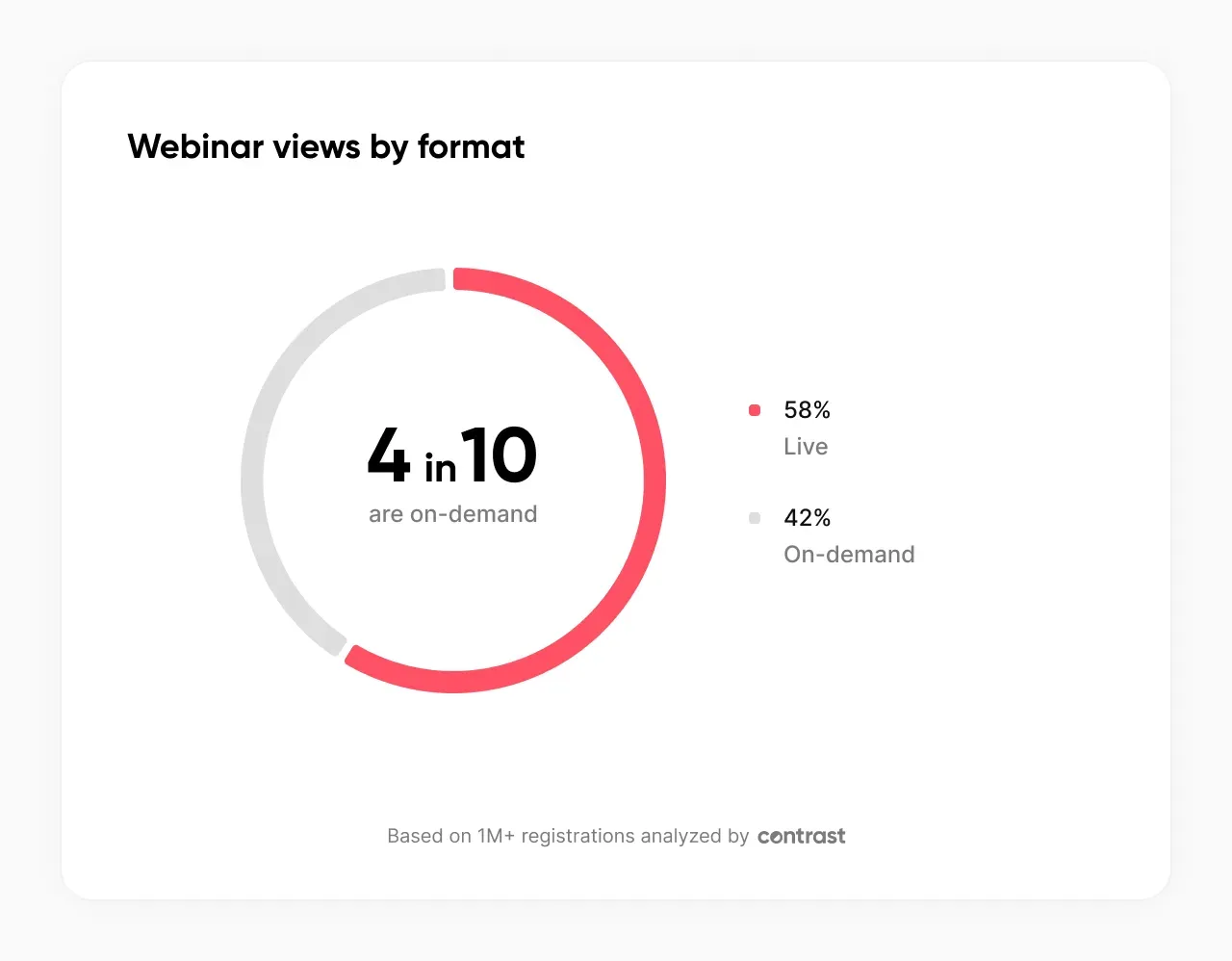
42% of Webinar Views Happen On-Demand
(Source: Contrast Webinar Stats Report 2026)
Almost half your audience will watch the replay instead of attending live.
Your content needs to work just as well for someone watching alone at their desk as it does for live participants. That means being extra clear about context, explaining things thoroughly, and making sure your slides are self-explanatory.
Also, stop obsessing over live attendance numbers. Your total reach is much bigger than what you see during the live session. The replay viewers are just as valuable — sometimes more because they're choosing to watch when they can give full attention.
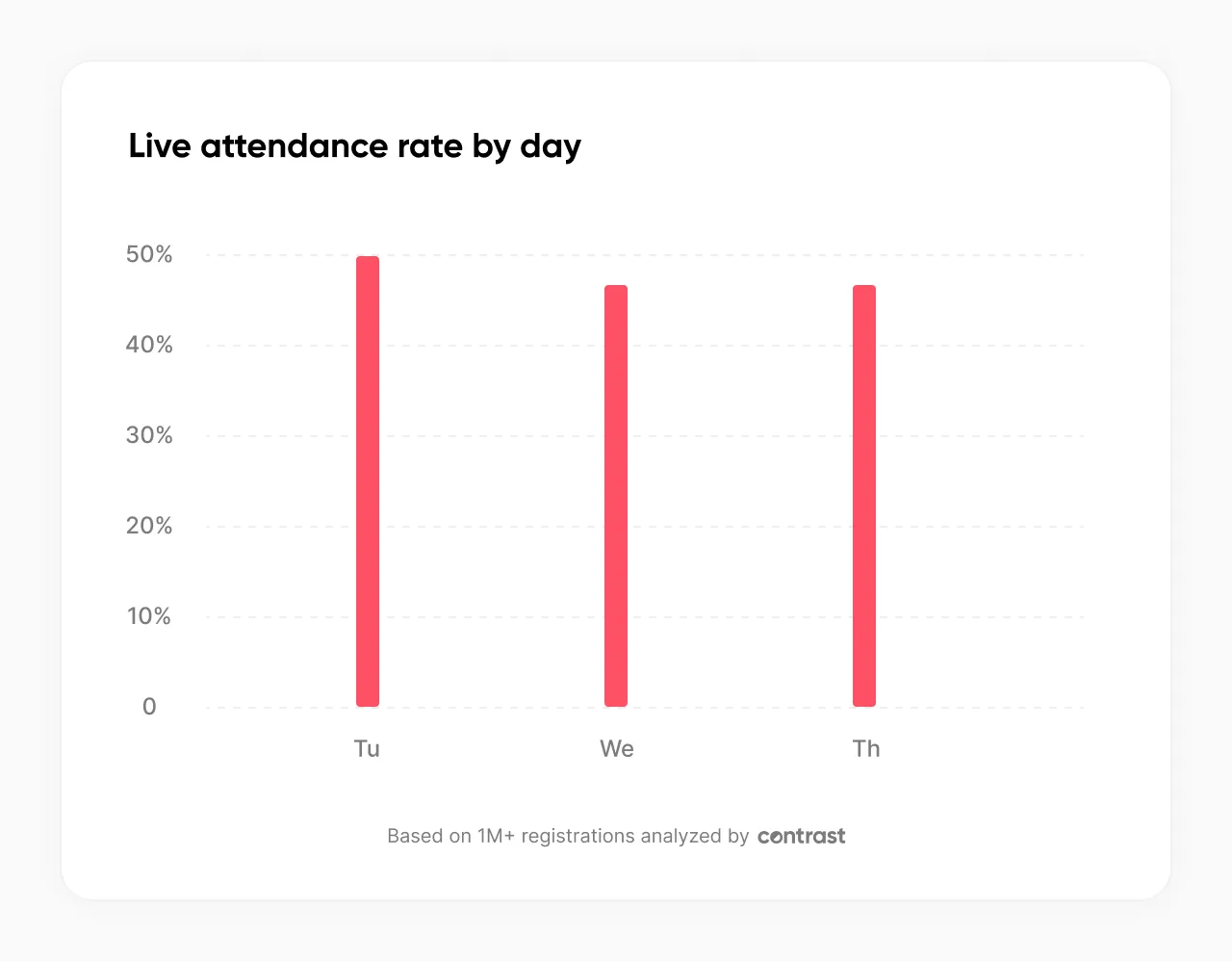
Tuesdays Get 50% Live Attendance
(Source: Contrast Webinar Stats Report 2026)
Tuesday is the best day for live attendance. Wednesday and Thursday tie for second place at 47% each.
If you're trying to maximize live interaction and Q&A participation, Tuesday afternoon is your sweet spot.
While Tuesday wins for live attendance, our registration data in the full webinar stats report tells a slightly different story about the best day to promote your webinar. See the full breakdown →
2PM Gets 55% Live Attendance
(Source: Contrast Webinar Stats Report 2026)
This time works because it accommodates multiple time zones without being terrible for anyone. A 2PM CET webinar is 8AM EST — early but manageable for Americans. An 11AM EST webinar is 5PM CET — perfect end-of-day timing for Europeans.
Think beyond your local time zone. Look at where your target audience is located and find times that work reasonably well for your main audience segments.
Don't try to accommodate every time zone perfectly. Pick the time that works best for your biggest audience segments and stick with it consistently.


Zefort boosted event attendance by 79%
See what drove the numbers — and how to replicate it
Learn moreWebinar Engagement Benchmarks
92% of Attendees Expect Live Q&A
(Source: Contrast Webinar Stats Report 2026)
Nine out of ten people showing up to your webinar aren't just there to listen. They're expecting a conversation.
This has a direct impact on how you should structure your sessions. Q&A is no longer a nice-to-have bolted onto the end, it's a core part of what makes the format worth attending in the first place. Webinars that don't offer it aren't just missing a feature; they're breaking an expectation that's now baked into audience behavior.
The practical implication: build your run-of-show around Q&A. Reserve real time for it, promote it in your registration copy, and use it as a differentiator from recorded video content.
Q&A before the live session on Contrast
Contrast's Q&A feature lets attendees submit and upvote questions even before the live event, so your host always knows what the room actually wants to discuss and frame the content around it. See it in action →
Polls on Stage Drive 15% More Completions
(Source: Contrast Webinar Stats Report 2026)
When polls are shown live on screen, more people participate, which increases completion rates by 15%.
Seeing a poll on stage creates a shared moment where everyone is invited to respond at the same time. It adds a sense of immediacy and subtle social pressure — people don’t want to be the ones sitting out.
Audience Drop-Off Typically Starts Around Minute 22
(Source: Contrast Webinar Stats Report 2026)
On average, webinar engagement begins to decline around the 22-minute mark. That's the point where attention naturally starts to fade if nothing new captures interest.
This moment often comes right after the introduction phase, when attendees have already heard the background, speaker context, and agenda. If the session hasn’t delivered a clear insight, interactive element, or strong forward momentum by then, viewers are more likely to disengage.
Want to Run Better Webinars?
Get a personalized demo and see how Contrast can elevate your webinars
Book your demoHow to Keep Your Webinar Audience Engaged
Keeping your audience engaged throughout your webinar is critical to reducing drop-off rates and increasing conversion. Here are practical, proven tactics to implement in every session:
1. Use Early Polls to Hook Attention
Why it’s important:
Most attendees decide within the first few minutes whether they’ll stay until the end or zone out. Launching a poll early does two powerful things: it grabs their attention by prompting immediate action, and it signals that this isn’t just another passive webinar where they can multitask. When people have to engage right away, they shift from "I’ll just listen in" to "I need to participate."
How and when to use it:
Right after your introduction, run a poll asking something like, "What’s your biggest challenge with [topic] right now?" This both engages your audience and gives you instant insights into their priorities. You can reference the results throughout your session to personalize your examples.
Polls on stage on Contrast
2. Embed Question Prompts Within Slides
Why it’s important:
Question prompts keep attendees mentally active throughout your presentation. They create micro-interactions that sustain attention and turn your webinar into a two-way conversation.
How and when to use it:
Include prompts such as, "Drop in the chat: how does this apply to your team right now?" every 5-10 slides, particularly before transitions to new sections. This ensures attendees remain engaged and process your content deeply.
Q&A on stage with Contrast
3. Actively Highlight Attendee Comments
Why it’s important:
Reading out attendee comments and mentioning names makes people feel seen and valued. It encourages more participation as attendees realize their input is acknowledged in real time.
How and when to use it:
Have a moderator or co-host monitor the chat during your session. For example, "That’s a great point, Anita – thanks for sharing your experience with that approach." Use this tactic especially during Q&A, polls, or when introducing new frameworks.
4. Use Mid-Webinar Recaps
Why it’s important:
Webinar attention tends to dip around the halfway mark. Pausing to recap key points helps refocus your audience and reinforces the most important information before moving on. This also gives attendees a moment to process what they’ve learned, making retention and understanding much stronger.
How and when to use it:
Plan a brief recap around the midpoint of your session, summarizing the core insights covered so far. Use clear visuals to signal the recap and keep it visually engaging. During this time, invite attendees to share their biggest takeaway. This turns a passive moment into an active one and primes the audience for the next section with renewed attention.
5. Use Widgets to Increase Real-Time Interaction
Why it’s important:
Widgets enhance the live experience by adding broadcast-quality elements and real-time feedback loops that keep attention high.
How and when to use it:
Contrast offers a "Live Ticker" displaying your webinar name and company website or socials — useful for branding and orienting late joiners. "The Most Trending Message" widget shows which chat message is getting the most emoji reactions, creating social proof and encouraging further interaction. You can use widgets consistently during key content sections or Q&A to add dynamism without distraction.

6. End with an Interactive Call-to-Action
Why it’s important:
Closing with an interactive CTA drives behavioural commitment and increases the chances attendees will act on what they learned.
How and when to use it:
Instead of a static ending, prompt attendees: "What’s one action you’ll take this week based on today’s webinar? Drop it in the chat." This tactic reinforces learning while giving you qualitative insights for follow-ups and future content.
Combine these engagement tactics with the benchmarks you’ve just learned to create webinars that people don’t just attend, but remember, act on, and share.
The Best Webinar Experience for your Viewers
Start for free with up to 30 registrants. No credit card needed.
Start for freeHow to Use These Benchmarks
Benchmarks are just one piece of the puzzle. Knowing that 61% of registrants watch your webinar and 42% watch the recording is useful, but what you do with this data is what drives results.
Use these benchmarks to set realistic targets, measure your progress, and refine your strategy. But don’t stop there. Combine this data with strategic content planning, smart promotion, and choosing the best webinar software to get the full value from every webinar you produce.
Ultimately, a successful webinar is one that serves your audience and moves your business forward, whether you’re outperforming every industry average or not.
And remember: this article covers just two parts of the picture. For the full 2026 webinar research including registration timing, platform behavior, content preferences, and more, see the complete Webinar Stats Report →.
Frequently asked questions (FAQs)
What is a good webinar attendance rate?
According to Contrast's 2026 data from 1M+ registrants, a good webinar attendance rate is between 44% and 50% of registrants attending live. Tuesday webinars achieve the highest live attendance at 50%. If your live attendance rate is above 44% you are performing at or above the average.
What is the average webinar attendance rate?
The average live attendance rate across all webinars on Contrast is approximately 44–50% depending on the day and time. 90-minute webinars achieve the highest live attendance at 67%, while 30-minute webinars average 44%. For the full breakdown by format, day, and time see our 2026 webinar statistics report.
What percentage of webinar registrants actually watch?
61% of registrants watch the webinar either live or on-demand. Of that 61%, approximately 42% of total views come from on-demand replay rather than the live session. This means your total reach is significantly larger than your live attendance number suggests.
What is the webinar registration to attendance benchmark?
The benchmark for webinar registration to live attendance is approximately 44–50%. For every 100 registrants you can expect 44 to 50 people to attend live, with the remainder either watching the replay or not watching at all. Webinars with fewer than 100 registrants consistently outperform this benchmark with 6% higher live attendance rates.